Every integration is now drawn by the shell itself: Console exposes 17 native sub-pages, Desktop exposes 17 independent windows — one desktop icon and one window per Pro card, pinnable to the Dock. Classic and Magazine carry the same capabilities through card flips and overlays.
Diagram: two ways to do the same job — embed the vendor page, or fetch the data and draw it yourself. This release moves all 14 integrations to the right.
Data always comes through the BestNav backend, so the browser never talks to the vendor directly and never holds credentials
One shared data and action contract across all four templates: change it once and every template follows
The service manager decides per service whether it appears as a desktop icon or on the mobile home screen
When a service is not configured yet, the window shows its setup form inline instead of sending you away
Service
What the native UI gives you
qBittorrent / Transmission / Aria2
Full task list with filtering, sorting and search; pause, resume and delete in place; when nothing is configured the window opens its setup form right there
Jellyfin / Emby
Paginated poster wall, search, details (synopsis, cast, seasons and episodes) and playback inside the window
Navidrome
Paginated album grid, track list and search, a native playback bar for your own library, plus shuffle a new batch
WebDAV
Full listing of the backup folder with a write-permission precheck, so you are not guessing whether the path is right
OpenList
Real thumbnails, pagination, upload progress and in-window preview, with an explicit hint when a format cannot be previewed
Gitea
Repositories are no longer capped at ten; a Commits | Files tab pair with inline source viewing
Home Assistant
Complete entity table with working switches, all drawn by this shell
Immich
Month-by-month timeline browsing and upload
TeslaMate
Lock, door, window and firmware state, charging / trips / efficiency charts, and a location page with a map (AMap in Chinese, OSM in English, with coordinate correction and geofences)
API usage / stocks
Balance, availability and latency trends per provider; your watchlist with historical snapshots
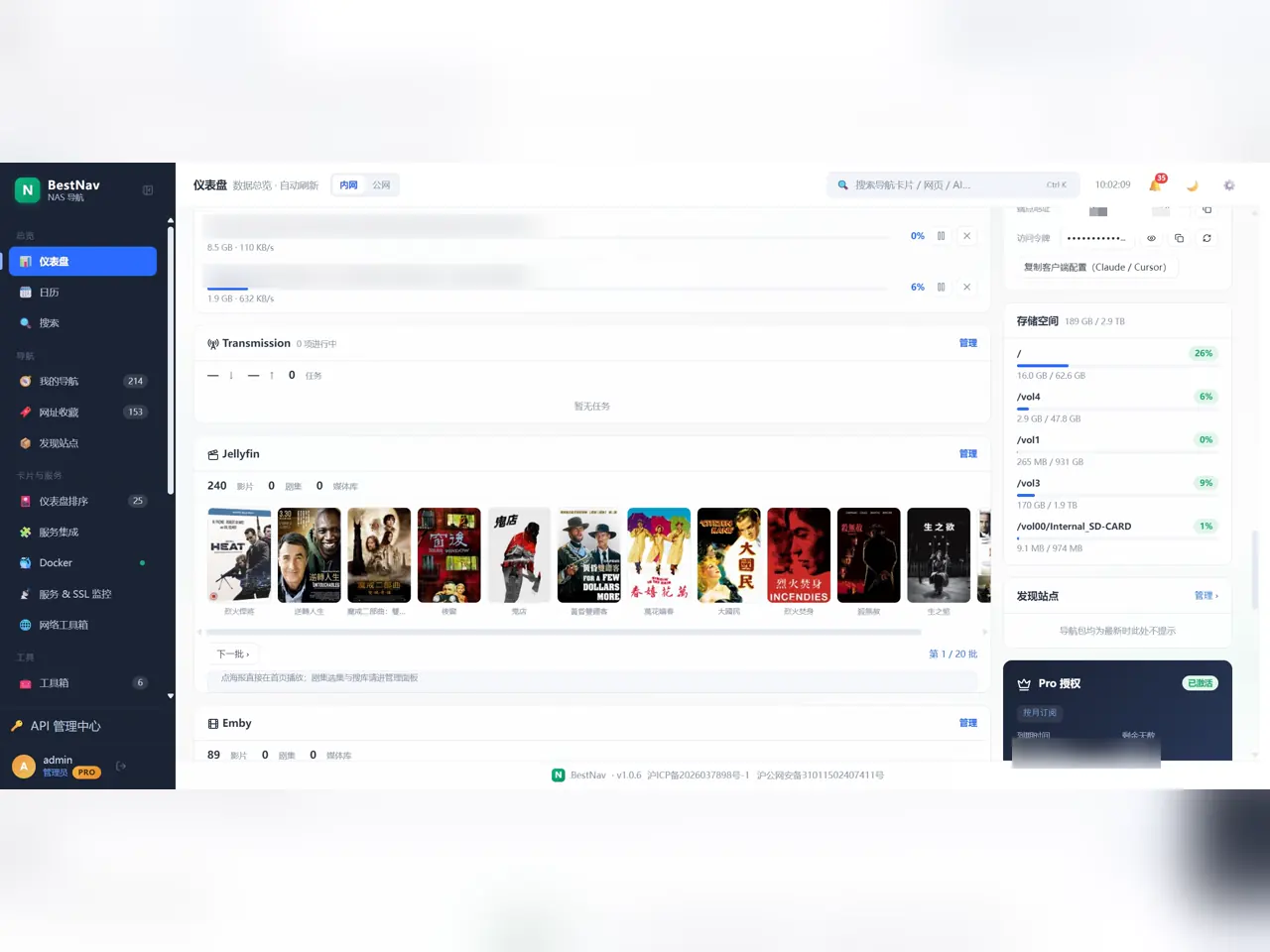
Diagram: the Console integration area — download queues alongside Jellyfin and Emby poster walls, each with a Manage link into its native sub-page.
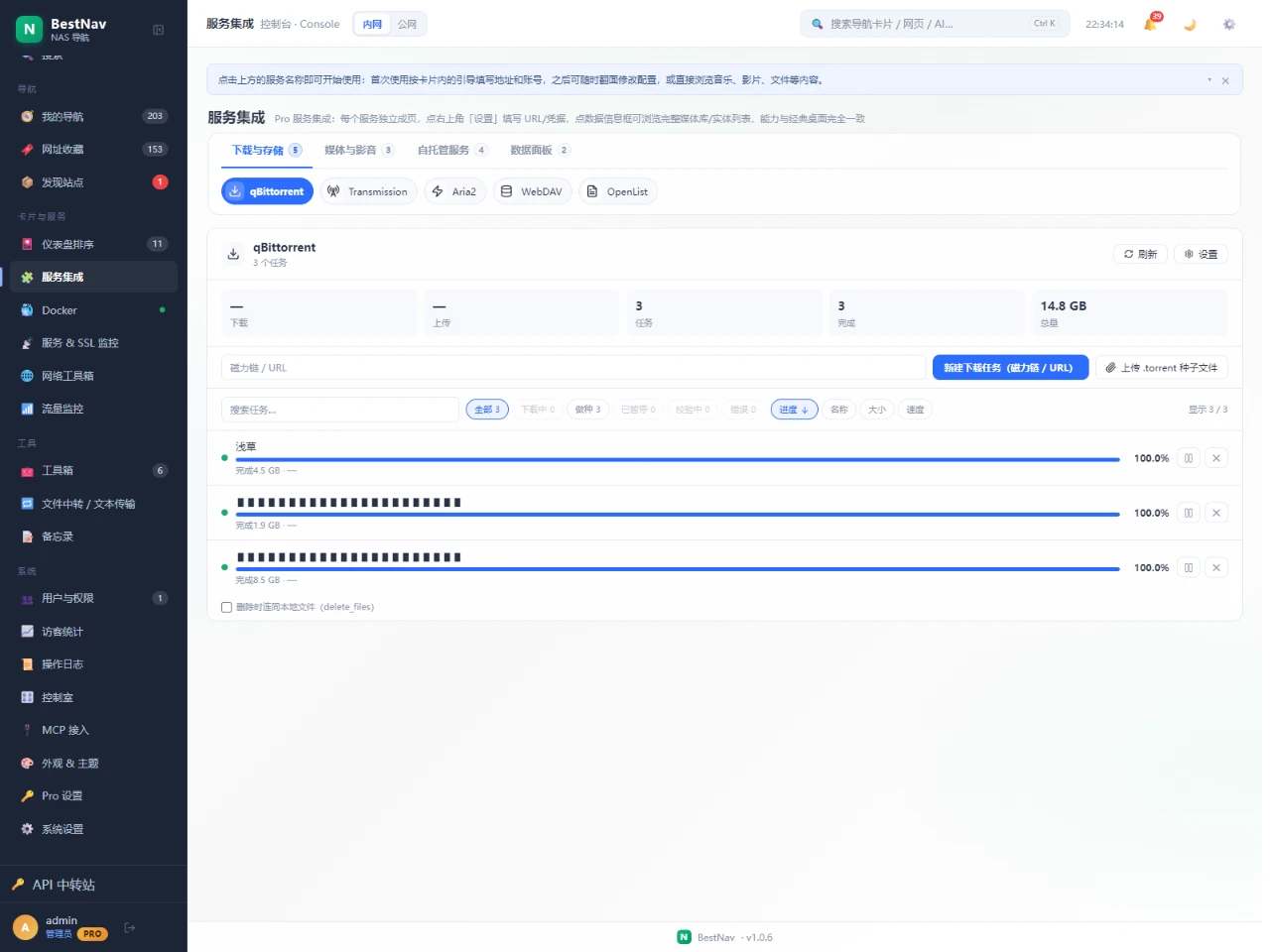
The qBittorrent native page: the queue splits into all / downloading / seeding / paused / checking / errored, sortable by progress, name, size and speed, with new-download and torrent upload in place. Task names are masked; the rest is the real interface.
Download Tools
Connect qBittorrent / Transmission / Aria2: the card shows live download and upload speed plus progress, while the window or sub-page holds the full task list — filter by state, sort, search, and pause, resume or delete right there.
qBittorrent: task list, speeds and seeding state, adding by magnet link or .torrent file
Transmission: real-time status (actions the backend does not support are simply not offered as dead buttons)
Aria2: download tasks and speed stats over RPC
When nothing is configured, the window opens the setup form immediately
Version compatibility: qBittorrent 4.1 – 5.2+ (adapts to the 5.2+ login protocol change, legacy versions included), Transmission 3.0 – 4.x, Aria2 1.34+.
Smart Home (Home Assistant)
Connect Home Assistant: the full entity table grouped by domain, live state for lights, switches and sensors, and working toggles — managed alongside your NAS services.
Version compatibility: all current Home Assistant releases; long-lived access token auth is stable across versions.
Vehicle Data (TeslaMate)
Connect TeslaMate with Overview / Charging / Trips / Efficiency / Location tabs lazy-loaded on demand; the overview shows lock, door, window and firmware state, and the location page draws a map right inside the panel.
Overview: location and vehicle status including door locks, windows and firmware
Charging: charge sessions and power curve
Trips: trip statistics and details
Efficiency: energy-trend line chart
Location: a map with parking position and geofences (AMap in Chinese, OSM in English, coordinates corrected)
Configure the TeslaMate PostgreSQL connection (host / port / database / account) on the card back, test it, then save. Compatible with TeslaMate 1.x.