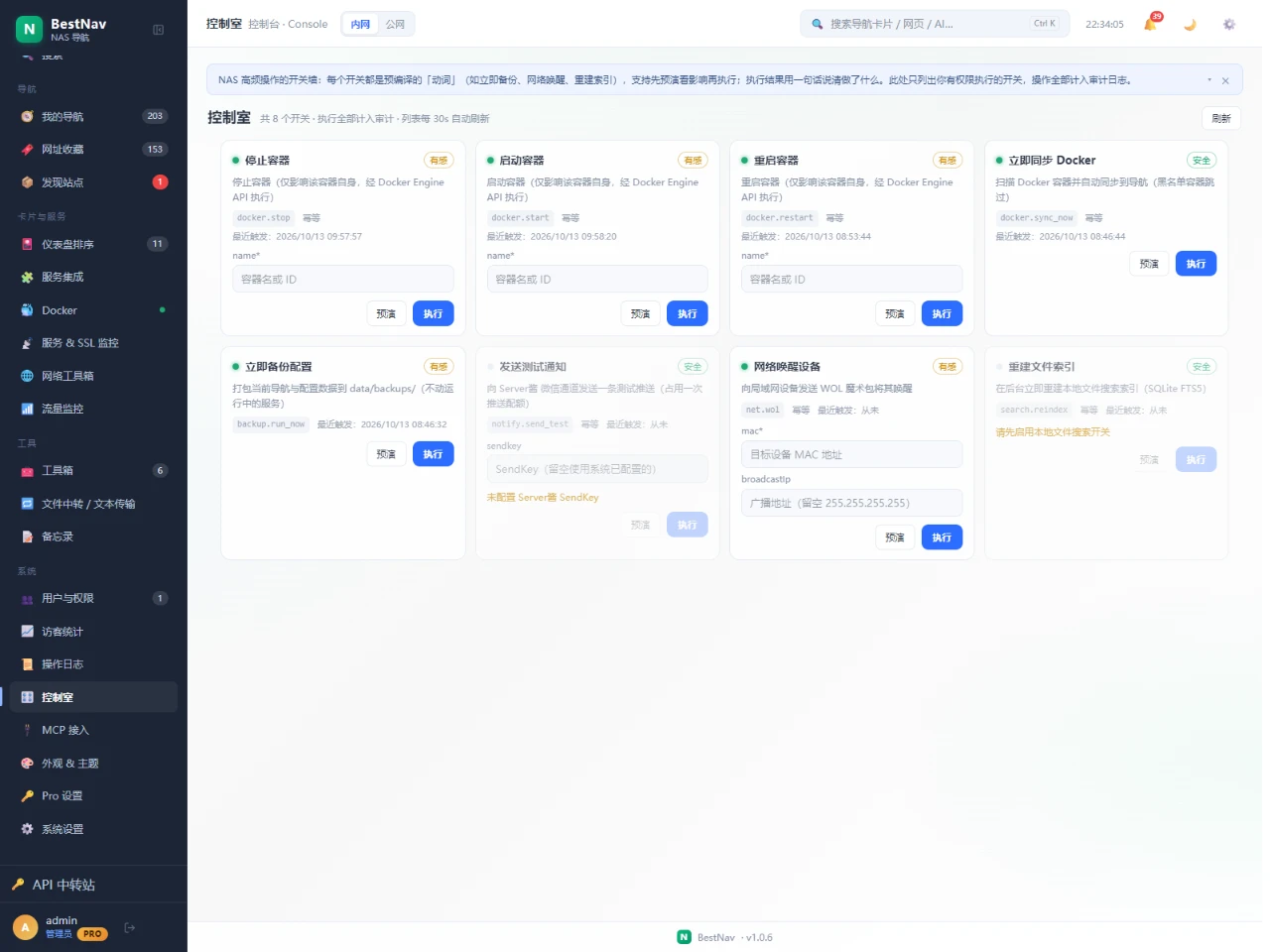
These actions used to live on different screens: container controls on the Docker card, backup in Settings, wake-on-LAN in the toolbox, reindexing in file search. The Control Room collects them on one page behind a single shared endpoint — pressing Back up now here runs exactly the same path as pressing it in Settings.
One screen instead of hunting for entries across cards and settings
Dry run first: see what will be affected before anything happens
Human verdicts: results read like "container jellyfin stopped"
Permission filtered: switches you may not run are not listed at all
Every trigger lands in the operation log
Diagram: the Control Room and MCP are two triggers of one entry point; executors reuse the existing features.
Switches available today
Built-in switches ship with the binary and update with it. Eight are available now, colour-coded by risk: safe (nothing is disturbed), noticeable (reversible but briefly affects a service) and high-risk (irreversible or wide impact — none built in yet).
Switch
Risk
Input
What it does
Stop / Start / Restart container
Noticeable
Container name or ID
Drives one container through the Docker Engine API; affects only that container
Sync Docker now
Safe
none
Scans containers and folds web services into navigation, skipping blacklisted ones
Back up now
Noticeable
none
Packs current navigation and config into data/backups/ without touching running services
Send test notification
Safe
SendKey (blank uses saved)
Pushes one test message to the ServerChan WeChat channel, consuming one quota
Wake device (WOL)
Noticeable
MAC address, broadcast (optional)
Sends a Wake-on-LAN magic packet; waking cannot be undone
Rebuild file index
Safe
none
Rebuilds the local file search index (SQLite FTS5) in the background; idempotent
Each switch shows its risk colour and the last time it fired; a greyed-out switch states why right next to it (for example Docker is not running).
The Control Room in the Console template: eight switches with risk colours, parameter fields, the dry-run / execute pair and last-fired timestamps. Bottom right, rebuild-index is disabled and says why — local file search has not been switched on.
Dry run and confirmation
Every switch has two buttons: Dry run and Run. A dry run changes nothing — it reports the blast radius, such as the current container state and how long a stop will take.
Safe switches run immediately
Noticeable and high-risk switches open a confirmation sheet that already contains a dry run result
Failures return one plain sentence and never retry automatically
Container stop and restart are synchronous calls (10 s grace period by default, images may set longer), so the button spins for a while — it is waiting for the engine, not stuck
Diagram: the full path from picking a switch to reading the verdict; safe switches skip the middle steps.
Where to find it
Console template: the Control Room view in the side rail
Desktop template: the Control Room window on the Dock
Any template: the Control Room tab inside the Settings dialog
AI assistants: the same switches over MCP (see the MCP guide)
All three entries show the identical list under identical permissions — nothing is clickable in one place and blocked in another.
Permissions and audit
Switch permissions reuse the existing rules rather than inventing new ones: container control needs the Docker operate permission, while sync, backup, notify, wake and reindex need admin. Under multi-user Pro, members only see switches they may run.
The list endpoint returns only what you are allowed to run — forbidden switches are not even revealed as greyed rows
Every trigger is logged with its origin (human, MCP, timer or event) and sanitised parameters
The invoke endpoint is rate limited so a stray script cannot hammer it
Visitors and signed-out sessions cannot see the Control Room at all
Questions
Greyed switch? The reason is printed beside it — usually Docker is not running or the feature is not enabled yet.
Where do I get the container name? Any name or ID from the Docker card works; each switch touches one container.
Does a dry run stop anything? No. It only reads state and reports the impact.
Can I add my own switch? Custom switches are planned but not open yet; built-ins ship with releases.
Is an AI pressing a switch riskier? Same path, same permissions, same rate limits, and the audit log marks the origin as MCP.